From research question to paper,
one unbroken flow
SKARI is an AI-powered research analysis platform for undergraduates, graduate students and early-career researchers doing empirical research. It connects surveys, statistics, machine learning and structural equation modeling in one place, and instead of stopping at running the analysis, it also explains why you are doing this analysis and how to read the results.
There are plenty of analysis tools, but the research flow is still split apart
Tools for statistics, surveys, machine learning and structural equation modeling already exist in number. Rather than adding one more technique, SKARI sets out to join the research process that has been split across those tools into one flow, and to make it usable with understanding by researchers who are not yet comfortable with statistics.
e.g. Google Forms · Qualtrics
collect responses
download responses.csv
e.g. SPSS · jamovi
load the file again
copy the results table
e.g. Python · Colab
tidy the data again
write the code from scratch
e.g. AMOS · R lavaan
redraw the model
line the variable names up again
The platforms are not joined up, so the researcher moves the data, lines it up and types it in again
SKARI takes on exactly this gap. Not a tool that runs the analysis for you, but one flow that carries you from choosing a method, through the settings, to understanding and interpreting the result and using it in a paper — with the researcher understanding it as they go.
So empirical researchers understand the analysis process
The analysis runs in six stepswhich variables to pick, which settings to use, and how a setting changes the result
Statistical analysis in SKARI does not jump straight to a results table once a method is chosen; the whole analysis is organized as a six-step flow. Each step explains which variables to choose, which settings to use, and how those settings can affect the result. So instead of simply pressing a button to run an analysis, users can proceed while understanding what they are setting right now and why.
One-way ANOVA
Tests whether the means of three or more independent groups differ significantly.
Choose variables
Pick the independent and dependent variables
ⓘ Sample size: 30 observations
The results come in a fixed ordersummary → what it means for the research question → the key figures → the detailed tables and charts
When the analysis finishes, instead of showing complex statistical tables first, results are presented in this order: a summary of the results, an interpretation tied to the research purpose, explanations of key indicators, and then detailed tables and charts. It first briefly shows what this analysis confirmed, then explains how that result relates to the research purpose or hypothesis you set out to test. After that, you can move into the detailed results as needed to check statistics, test results, charts and tables.
The interpretation is not the AI reading back the numbers shown on screen. It is designed so that the analysis and test results actually computed on the backend are structured and passed along, and the meaning of the results is explained on that basis.
AI Interpretation
Weight differed significantly by group; trt2 had the highest mean and trt1 the lowest.
Statistical results
Overall group effect F(2,27)=4.85, p=.016, η²=.264
Welch robust test F(2,17.13)=5.18, p=.017
Tukey HSD: trt2 vs trt1 mean diff=0.865, p_adj=.012
Summary
- The one-way ANOVA is significant, indicating a difference in mean weight across the three groups.
- The effect size is large (η²=.264): group explains about 26.4% of the variance in weight. The bias-corrected ω² is .204.
- trt2 had the highest mean (M=5.53) and trt1 the lowest (M=4.66), a difference of 0.87 units.
- Tukey HSD showed a significant difference between trt2 and trt1, but after adjustment neither treatment group differed significantly from the control group.
- The observed group difference is substantial relative to overall variability and practically meaningful, but uncertainty remains in the comparisons with the control group.
Assumption review
The assumptions were met. In the Shapiro-Wilk test, neither the residuals nor any group deviated significantly from normality, and the Levene test showed homogeneous variances (F(2,27)=1.24, p=.306). The Brown-Forsythe test also supported equal variances (F(2,27)=1.12, p=.341).
Recommendations
- Since normality and equal variances are met, use Tukey HSD for post-hoc pairwise comparisons.
- Report the less-biased ω²=.204 alongside η²=.264, and interpret the effect as large.
- In follow-up analyses, treat the trt2–trt1 contrast as the main significant difference, and present confidence intervals and practical implications with it.
- To sharpen the treatment-versus-control comparisons, consider replicating with a larger sample.
Every table says where to lookwhat the table is there to check, which column and statistic to read
Each table, too, goes beyond presenting numbers: it explains what the table is meant to check, which columns and statistics to look at, what the values mean, and how they can be interpreted in the research findings.
Descriptive Statistics
This tableshows the sample size, mean, spread and range of each group being compared.
| Group | N | Mean | SD | SE | 95% CI | Min | Max |
|---|---|---|---|---|---|---|---|
| ctrl | 10 | 5.0320 | 0.5831 | 0.1844 | [4.61, 5.45] | 4.170 | 6.110 |
| trt1 | 10 | 4.6610 | 0.7937 | 0.2510 | [4.09, 5.23] | 3.590 | 6.030 |
| trt2 | 10 | 5.5260 | 0.4426 | 0.1400 | [5.21, 5.84] | 4.920 | 6.310 |
How to read itFirst scan the group means for the pattern the ANOVA will test, then compare the standard deviations across groups. If the spread differs noticeably, that signals a likely violation of equal variances — in that case, trust the Welch ANOVA result below. Also check whether any group has an unusually small N, which weakens the comparison.
Seen as a chart, and changed to see what happens3D views, and a simulation that shows how the result moves when a variable moves
Recently, beyond standard 2D charts, we have been adding 3D visualizations for certain analyses, along with simulation and prediction-profiler features that let you change variable values directly and see how the results change.
3D Scatter Plot
Each row is placed on the three dimensions obtained from the analysis. Distances on screen change with the camera angle, so read positions by axis values rather than by the gaps between points.
X PC1 · 73.0% (−2.77 ~ 3.30)Y PC2 · 22.9% (−2.65 ~ 2.68)Z PC3 · 3.7% (−1.00 ~ 0.855)150 points
Axes
Colour by
ClusterClick a group to hide it. Drag the plot to rotate.
Display
The code that produced it stays with itthe settings you picked on screen, written out as R or Python with comments keyed to the six steps
And every analysis comes with the R or Python code actually used in the computation. The variables and settings chosen on screen carry over into the code as-is, and the code is annotated to match the six-step flow, so you can follow how each setting turns into a function and option. Because results are never left as a black box, when an advisor or committee member asks how a number was obtained, you can show the analysis process exactly.
Running this code produces the same result as the screen. R and Python are free for anyone to use, so results can be reproduced without any particular program, and the code can go straight into a paper’s appendix or answer data-and-code sharing requirements. Researchers also pick up the code naturally as they work, which helps when they later move on to more complex analyses.
# 1. Variables: group and value (weight)
data <- PlantGrowth
data$group <- factor(data$group)

# 2. Settings: standard ANOVA + Welch, effect sizes η²·ω²
library(car)
library(effectsize)

# 3. Data check: equal variances (Brown-Forsythe) and residual normality
leveneTest(weight ~ group, data = data, center = median)
fit <- aov(weight ~ group, data = data)
shapiro.test(residuals(fit))

# 4. Summary: ANOVA and Welch test
summary(fit)
oneway.test(weight ~ group, data = data, var.equal = FALSE)

# 5·6. Effect sizes and post-hoc test
eta_squared(fit)
omega_squared(fit)
TukeyHSD(fit)
Output summary(fit) output
            Df Sum Sq Mean Sq F value Pr(>F)
group        2  3.766  1.8832   4.846 0.0159 *
Residuals   27 10.492  0.3886
✓ Matches the on-screen result It produces the same F(2, 27) = 4.846, p = .016 as the 6-step screen above.
In short, the aim of Statistical Lab is not simply to “run statistical analyses for you” but to provide the flow empirical researchers actually need in real research: analysis settings → execution → understanding results → visualization → interpretation → use in papers and reports → reproducible code.
Connecting empirical survey research with statistical analysis
Today the survey sits apart from the analysisresponses downloaded as a CSV and carried into another program
Empirical research using surveys is extremely common across fields. Yet on typical survey platforms, after collecting responses you often have to download the data as Excel or CSV and then move to another program such as SPSS, R or Python to run the statistical analysis.
The usual way: survey here, analysis there
Graduate Student Research Environment Survey
↓ Download CSV| A | B | C | |
|---|---|---|---|
| 1 | Timestamp | Q2 | Q7 |
| 2 | 9/21 14:02 | Master's | Strongly agree |
| 3 | 9/21 14:05 | PhD student | 4 |
| 4 | 9/21 14:11 | Master's | |
| 5 |
df <- read.csv("responses.csv")
df$Q7 <- recode(df$Q7,
  "Strongly agree" = 5, ...)
df$Q2 <- factor(df$Q2)
# Decide yourself which analysis fits
summary(aov(Q7 ~ Q2, data = df))
Every time you switch tools you have to move the data and redefine variables, and deciding which analysis fits is left to the researcher.
From the survey through to the analysis, in one gothe structure and the distribution read on the spot, with a fitting analysis suggested
SKARI aims to connect survey design, data collection and statistical analysis into a single research process. Once a survey is complete, you can check the data structure and response distributions right in Survey Lab without moving the responses to another program, and SKARI also recommends which statistical analyses can be applied based on the collected data and variable types. For example, you can see — according to the data structure and research purpose — whether you need to check differences between groups, analyze relationships between variables, or run regression or factor analysis.
SKARI: from survey to analysis, in one place
- Survey design
- Collect responses
- Review responses
- Recommend analysis
- Statistical analysis
Survey items
Q2 What is your current degree program? Master's · PhD · Integrated
Q7 I can easily ask my advisor for help. Likert 1–5
Automatically linked data
| Variable | Type | Responses |
|---|---|---|
| Q2 Degree program | Categorical (3) | 214 |
| Q7 Asking for help | Scale (1–5) | 214 |
| Q8–Q18 | Scale (1–5) | 214 |
Recommended analysis
One-way ANOVA
Analyze nowWithout downloading files or re-defining variables, you go from reviewing responses to analysis on the same screen.
Survey types that match the research purposebeyond multiple choice and Likert: AHP, Conjoint, MaxDiff, Kano, NPS, price sensitivity
Beyond standard multiple-choice and Likert-scale surveys, SKARI also supports specialized survey techniques for different research purposes, such as AHP, Conjoint, MaxDiff, Kano, NPS and price sensitivity analysis. Methods that would otherwise need separate specialist software or complex design are packaged as templates, connecting design, response collection and analysis.
Analysis templates
Rather than a generic survey analysis, each produces the specialist output that fits its method.
When it closes, the results are already sortedresponses, completion rate and margin of error, then each item’s distribution and how to read it
When a survey closes, the results screen first summarizes things like response count, completion rate, margin of error and average response time automatically. For each item, the response distribution comes with an interpretation of how to read it, and you can cross two items to compare right away how responses differ.
✦ Summary This survey collected 100 responses with a 100% completion rate. At a 95% confidence level, the margin of error is ±9.8%.
Segment comparison
Crosses two items to compare how responses differ| Q1 ↓ / Q2 → | 1 | 2 | 3 | 4 | 5 | Total |
|---|---|---|---|---|---|---|
| 1 | 00.0% | 00.0% | 00.0% | 00.0% | 00.0% | 0 |
| 2 | 00.0% | 228.6% | 342.9% | 228.6% | 00.0% | 7 |
| 3 | 00.0% | 26.7% | 930.0% | 1550.0% | 413.3% | 30 |
| 4 | 00.0% | 00.0% | 717.1% | 2356.1% | 1126.8% | 41 |
| 5 | 00.0% | 00.0% | 00.0% | 627.3% | 1672.7% | 22 |
Q1It is hard to handle my work responsibilities within the time given.
Top: Agree (41%) LikertResponse summary
| Option | Responses | Share |
|---|---|---|
| Strongly disagree | 0 | 0.0% |
| Disagree | 7 | 7.0% |
| Neutral | 30 | 30.0% |
| Agree | 41 | 41.0% |
| Strongly agree | 22 | 22.0% |
💡 Interpretation
Responses are spread across several options. Three options exceed 20%, and although the most common answer is "Agree" (41.0%), opinion is not concentrated on one side.
Positive responses ("Agree" plus "Strongly agree") total 63%, negative responses 7%. As a next step, splitting by respondent group shows whether choices differ between groups.
Σ Statistical details
n = 100 · mean 3.78 · SD 0.87 · median 4 · mode 4
Research Modethe analysis a study needs, carried on there, without downloading anything
After a survey closes, SKARI provides a separate Research Mode in addition to the basic results screen. In Research Mode you can run the statistical analyses your research needs on the spot, without downloading the response data. Everything the full survey research process requires is ready — from descriptive statistics for understanding response distributions, to scale reliability and factor structure, tests of group differences, regression and driver analysis to find the factors behind outcomes, and response quality and missing-response handling. Each result comes with an explanation of what it shows and how to read it, so it leads straight into analysis you can use in a paper, beyond a simple response summary.
- Understanding response distributions
- Descriptive statistics, radar chart, crosstabs (chi-square test), association rules (market basket analysis)
- Reliability and scale structure
- Reliability (Cronbach α, reliability by dimension), factor analysis, correlation matrix
- Differences between groups
- t-test, Welch test, Mann-Whitney test, analysis of variance (ANOVA), Kruskal-Wallis test, Tukey post-hoc test
- Factors driving outcomes
- Multiple regression, driver analysis
- Change over time
- Trends by segment
- Data quality
- Response quality diagnostics, response time analysis, missing-response handling
Response distribution
Bars are split at the neutral point to show whether responses lean positive or negative. The further left, the more negative responses; the further right, the more positive. The number on the right is the mean — and even with the same mean, the shape of the distribution can differ a lot.
2345Bars split at the neutral point; the number on the right is the mean
So Survey Research Lab is not just a survey builder but an environment that supports the empirical research flow of research question → survey design → data collection → reviewing responses → analysis recommendation → statistical analysis.
Machine learning analysis and interpretation for empirical researchers
Social science research increasingly uses machine learning for prediction, classification and variable importance alongside traditional statistics. But existing AutoML tools often focus on training models automatically and comparing performance, so researchers unfamiliar with machine learning can find it hard to understand why a certain variable matters or why a certain observation was predicted the way it was.
It does not stop at comparing accuracyseveral models trained and compared, and then why they predicted what they did
SKARI Auto Modeling trains and compares multiple machine learning models automatically, and focuses on explaining the model’s decisions and predictions so researchers can understand them. Depending on the classification or prediction goal, you can train models such as Logistic Regression, Decision Tree, Random Forest, Gradient Boosting, SVM, KNN and XGBoost, and compare their performance with cross-validation and evaluation metrics. The whole process runs in order: data check, feature setup, model training, performance comparison, model explanation, prediction and simulation.
| Model | AUC | Accuracy | F1 |
|---|---|---|---|
| Random Forest model to explain | 0.870 | 0.842 | 0.781 |
| LightGBM | 0.868 | 0.839 | 0.776 |
| XGBoost | 0.866 | 0.838 | 0.772 |
| Gradient Boosting | 0.861 | 0.833 | 0.765 |
| Logistic Regression | 0.842 | 0.815 | 0.731 |
| SVM | 0.835 | 0.811 | 0.722 |
| KNN | 0.803 | 0.790 | 0.684 |
| Decision Tree | 0.781 | 0.772 | 0.667 |
The random forest, with the highest AUC, was chosen as the model to explain. When the gap between the top models is small, choosing the easier-to-interpret model is also an option.
Which variables carried the resultSHAP — the conclusion first, the chart after it as the evidence
Once a model is chosen, you can understand the results step by step through a range of explanation techniques. Each screen shows the conclusion before the chart, and the chart follows as evidence for that conclusion. SHAP importance shows which variables had the biggest influence on the model’s predictions across the whole dataset and in which direction, while PDP and ALE show in which direction the model’s predictions change overall as a particular variable changes.
This result Contract type had the biggest influence on the churn prediction, followed by tenure and monthly charge. These three variables mostly pushed the churn prediction up, while auto-pay pushed it down.
What is this and how do I read it
What is it SHAP importance shows how much each variable moved the model’s predictions.
How to read it Variables higher up have a bigger influence. Red is the direction that raised the churn prediction, green the direction that lowered it, and the small text shows how consistently that direction appeared in the sample.
Why this one case came out this waySHAP waterfall and what-if — change a condition and watch the prediction move
The SHAP waterfall explains, variable by variable, why a particular individual or observation received its prediction, and What-if Simulation shows how the prediction changes when you change the value of just one variable while keeping that observation’s other conditions fixed. With SHAP Interaction, you can explore how combinations of two variables affect the model’s predictions.
SHAP waterfall
From the 26% average to 71%This result A month-to-month contract (+21%p) and a short 3-month tenure (+14%p) drove most of the prediction up, while using auto-pay lowered it slightly.
What-if
Change just one conditionThis result Switching to a 1-year contract drops it to 44%, out of the churn prediction. Monthly charge or support calls alone do not bring it below the cutoff.
1. Variable to change
2. New value
What to check before it goes into the paperprediction is not cause, overlapping variable effects, and the limits of the sample
Finally, it tells you what to check before moving results into a report. It keeps you from reading predictive relationships as causal, and points out that the effects of related variables can appear to overlap and that explanations were computed on a sample rather than the whole dataset. Then, using only the preceding results and no newly computed numbers, the AI summarizes everything in one paragraph that researchers can use as a first draft of their results write-up.
Things to watch when interpreting
Write "churn was predicted to be higher among month-to-month customers", not "month-to-month contracts cause churn".
Contract type and tenure move together, so one’s effect may include part of the other’s.
The values were measured on 200 of all 48,210 customers, so do not quote them to the decimal point.
AI summary
No newly computed numbersThis model predicts the probability of churn within 90 days and discriminates well, with a validation AUC of 0.87. The variables that moved predictions most are contract type, tenure and monthly charge. Customer #10482’s 71% prediction is mainly the result of a month-to-month contract (+21%p) and a short tenure (+14%p) raising it from the 26% average. Switching only to a 1-year contract lowers it to 44%, below the 50% classification cutoff. However, this is the model’s response according to the correlations it learned, not evidence that changing the contract actually reduces churn.
So Auto Modeling is not an AutoML that only shows “which model performs best”, but a machine learning environment built so empirical science researchers can understand “which variables matter, why this prediction came out, and how the result changes when conditions change”.
From the theoretical model of empirical research to surveys and structural equation analysis
Structural equation modeling (SEM) is widely used in business, education, psychology and the social sciences to test theoretical relationships. But in real research, running an SEM is not the end of the study. Researchers first review prior work and theory, define constructs and the relationships between variables, form research hypotheses, and then write survey items to measure them. After that, they collect data, verify reliability and the measurement model, and then analyze the structural model.
From a research topic to a research modelthe topic goes in, and the theory, constructs, relationships and hypotheses are drafted from it
SKARI SEM Lab connects this process into a single research flow. When a researcher enters a research topic or question, AI helps review related theories, constructs, relationships between variables and research hypotheses, and draft the theoretical model.
← Start another way
Check before you proceed. It is better to fix a partially read model than to accept a misread one as-is.
3 variables, 3 structural paths recognizedVariables
Paths
Theories to consult
Measured by survey, then analysed straight awayitems for each construct → the survey run in Survey Lab → the collected responses analysed
Based on the designed research model, you can write survey items to measure each construct and run the actual survey through Survey Lab. When the survey is complete, you can connect the research model and survey structure to SEM Lab for analysis, without downloading the collected data again or setting up variables from scratch.
Constructs in the modelSEM Lab
| Construct | Code | Items |
|---|---|---|
| Service quality | SQ | 3 |
| Satisfaction | CS | 3 |
| Revisit intention | RI | 3 |
3 paths · hypotheses H1 · H2 · H3
the model built in 01, unchanged
Measurement items3 per construct
sq1Staff responded kindly
sq2Requests were handled promptly
cs1Overall I am satisfied with this café
the construct ↔ item links are stored with them
Distribution · collectionSurvey Lab
Staff responded kindly
214responses collected
86% completed · 3 min 12 s on average
Straight to the measurement modelSEM Lab
the responses arrive already attached to the constructs
there is no screen for assigning the variables again
download the CSVassign the variables againre-link the constructs— none of these three
A report of nine chapterssample, descriptives, reliability, measurement, fit, structural model, effects, diagnostics, AI reading
When the analysis is done, the results are organized into a report of nine chapters. It runs in the order of sample and data, descriptive statistics, reliability, measurement model, model fit, structural model, effect decomposition, diagnostics and limits, and AI interpretation — structured to follow how the results chapter of a paper is written, so it can serve directly as the skeleton of your results write-up. Each chapter shows what it checks and the criteria for judging it, and if any result falls short of a criterion, it tells you first, at the top of the chapter. Below is an example of the measurement model chapter.
04
Measurement model
Confirmatory factor analysis checks whether each item measures its intended construct well, and whether the constructs are distinct from one another.
4.1 Factor loadings at a glance
Shows how strongly each item measures the latent variable it belongs to. Typically .50 is the minimum and .70 the recommended level.
4.3 Convergent validity
Checks how well each latent variable explains its own items, using composite reliability (CR), average variance extracted (AVE) and the lowest loading.
| Latent variable | CR | AVE | √AVE | Min β | Verdict |
|---|---|---|---|---|---|
| Job stress | .805 | .580 | .762 | .720 | Met |
| Burnout | .848 | .651 | .807 | .774 | Met |
| Turnover intention | .842 | .640 | .800 | .772 | Met |
CR of .70 or higher and AVE of .50 or higher are the usual criteria.
4.4 Discriminant validity (HTMT)
Checks whether two different latent variables are empirically distinct concepts.
| Pair | HTMT | Verdict |
|---|---|---|
| Job stress – Burnout | 1.005 | Not met |
| Job stress – Turnover intention | 1.053 | Not met |
| Burnout – Turnover intention | .991 | Not met |
HTMT below .85 meets the strict criterion; below .90 meets the lenient one.
This chapter also includes a factor-loading heatmap, an item-level estimates table (B, β, SE, z, p) and the Fornell-Larcker criterion.
No lavaan syntax to writedraw it on screen, or upload a photo of the model you drew by hand
Another important feature is that you do not have to write lavaan syntax yourself. When a researcher builds the research model on screen by connecting latent and observed variables and drawing paths between them, SKARI converts that structure into an analyzable lavaan model. You can design and analyze a research model visually without writing code, and after the analysis the R code actually used is provided as well, so the results can be reproduced.
Besides drawing directly on screen, you can also upload an image of a research model drawn by hand on paper or a tablet. SKARI recognizes the latent variables, observed variables and paths in the image and turns them into an editable research model and a lavaan model, so researchers can sketch the model the way they are used to and start the analysis right away.
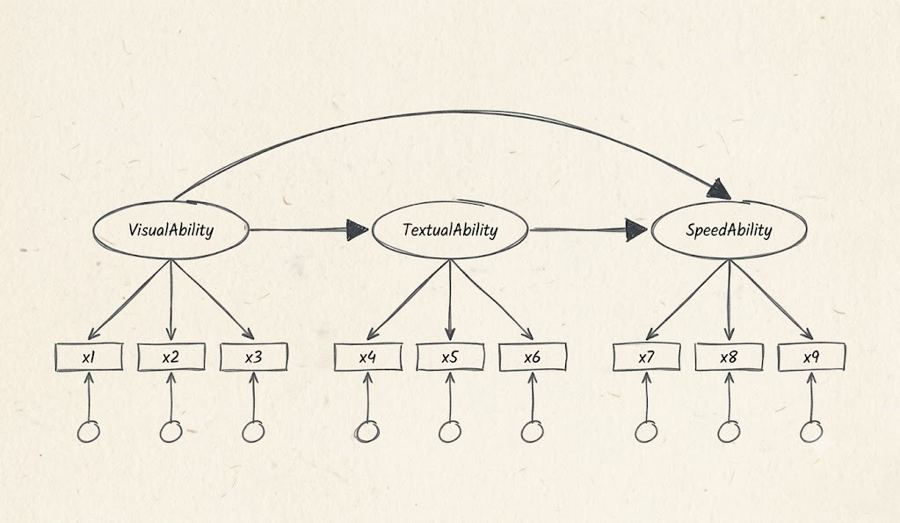
Recognized model
# Measurement model
VisualAbility  =~ x1 + x2 + x3
TextualAbility =~ x4 + x5 + x6
SpeedAbility   =~ x7 + x8 + x9
# Structural model
TextualAbility ~ VisualAbility
SpeedAbility   ~ TextualAbility + VisualAbility
Edit on canvas
The core of SEM Lab is not simply running structural equation models but connecting empirical research steps that used to be split across several tools — exploring theory → designing the research model → setting hypotheses → writing survey items → running the survey → collecting data → verifying reliability and the measurement model → analyzing the structural model → interpreting results → reproducible code — into a single flow.
The users SKARI focuses on
SKARI does not aim to be a general-purpose platform for every data analysis user. Its main users are undergraduates, graduate students and early-career researchers doing empirical research while learning statistics and research methods.
In particular, it targets researchers in fields that lean on surveys and empirical analysis — business, economics, education, psychology, sociology, public administration, health and nursing.
What matters to them is not becoming a statistics expert, but choosing an analysis method that fits their research question, understanding the analysis process, and interpreting the results correctly to complete a paper or research report.
SKARI focuses on the problems that come up again and again in this process.
“Which analysis should I choose?”“Why is this setting needed?”“What should I check in the results table?”“How should this result be interpreted in my research?”
What SKARI sets out to build
SKARI does not aim to replace any single statistical software package.
Today, empirical researchers use a separate service for surveys, run statistical analysis in SPSS, R or Python, and when they need structural equation modeling or machine learning, have to move to yet another tool and environment.
There are already plenty of tools that do each of these jobs well. The problem is that researchers have to move between them themselves — moving data, choosing analysis methods, and tying different results together into a single research flow.
For less experienced researchers especially, deciding what to do at each step and interpreting analysis results in the language of research can be a bigger challenge than using the tools themselves.
This is exactly where SKARI aims to help: connecting a research process that was scattered — from survey design and data collection to statistical analysis, machine learning, structural equation modeling, interpretation and report writing — into a single flow, and making it possible for users to move through each step while understanding it.
Not a tool that runs analyses for you, but a platform that helps you understand your research
It connects the design, surveys, statistics, machine learning and structural equation modeling that empirical research needs into a single flow, and guides you from why you are doing an analysis to how to read the results.
Research design → Survey → Data collection → Statistics · ML analysis → Understanding results → Simulation → Paper · report → Reproducible code
SKARI — AI-powered Research Analysis Platform · All figures on screen are example data.